Starting an online store is an exciting venture, but it can also feel overwhelming. The good news? Shopify makes the process simple, even for beginners. With its user-friendly interface and robust features, you don’t need to be a coding expert or a tech guru to build a professional-looking e-commerce store.
Whether you’re dreaming of creating a side hustle or looking to move your brick-and-mortar business online, this guide will show you how to set up your Shopify store step by step. Expect actionable tips to get started, choose the best theme for your brand, add products, and market your way to attracting your first customers.
But keep in mind one thing every thing is changing day by day from it’s shape to it’s algorithm…! This Guide is for beginners who don’t even know the “S” of Shopify business…!
This guide is all about to design a store but there are many other factors to consider for starting a full fledge E-commerce business. Stay tuned till the end for tips and tricks
What Is Shopify and Why Choose It?
What is Shopify?
At its core, Shopify is an all-in-one e-commerce platform that allows you to create, manage, and scale your online store. With Shopify, you can:
- Set up an online store without any coding knowledge.
- Manage inventory, orders, and payments in one place.
- Use built-in tools to handle shipping and taxes.
It’s perfect for beginners because it simplifies complex processes. Shopify empowers you to focus on growing your brand rather than worrying about the technical aspects of running an online store.
Why Choose Shopify?
Shopify is trusted by millions of businesses worldwide, from small startups to global powerhouses like Gymshark and Allbirds…! Here’s why:
- Ease of Use: Its drag-and-drop editor and intuitive dashboard make store setup a breeze.
- Built-In Tools: Access features like payment processing, inventory management, and marketing tools straight out of the box.
- Scalability: Whether you’re processing one order a week or hundreds a day, Shopify grows with your business.
For SEO purposes, make sure terms like “How to start a Shopify store” and “online store setup” are naturally included throughout your content!
Setting Up Your Shopify Store: A Step-by-Step Guide
Step 1: Sign up for a Shopify Account
Visit Shopify‘s website and sign up for a free trial to get started. Shopify offers a 3-day FREE trial, perfect for testing its features before committing to a plan…!
Make sure to choose a plan that aligns with your needs and budget once your trial ends. Shopify plans are flexible, catering to businesses of all sizes.

Step 2: Customize Your Store Name and Basic Settings
Your store name should be memorable, relevant, and aligned with your brand’s identity. When signing up, you’ll be prompted to choose your store name—don’t worry, you can change this later if needed.
Set up basic settings under the “Settings” tab, including store currency, language, and contact information.
Pro tip: Consistent branding is key! Choose a logo, fonts, and colors that reflect your style.
Step 3: Explore the Shopify Dashboard
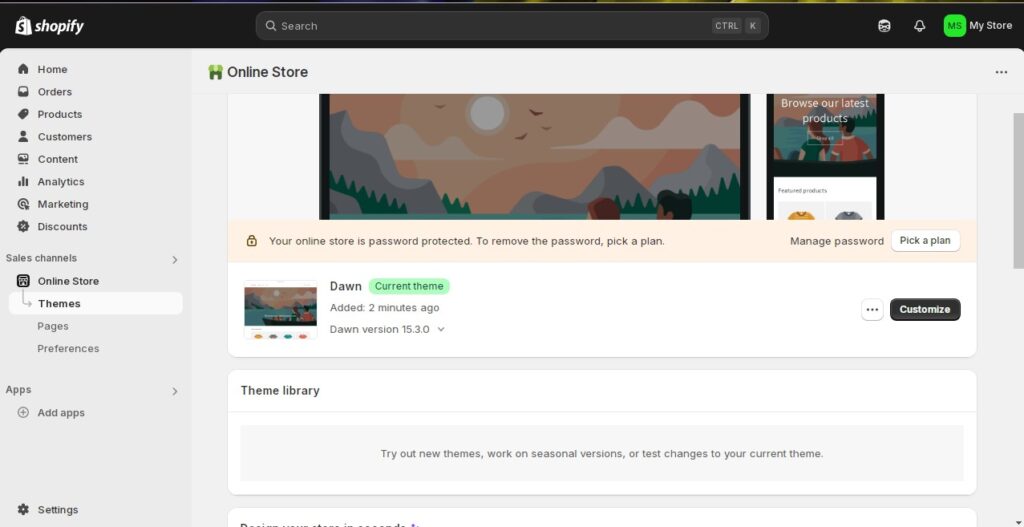
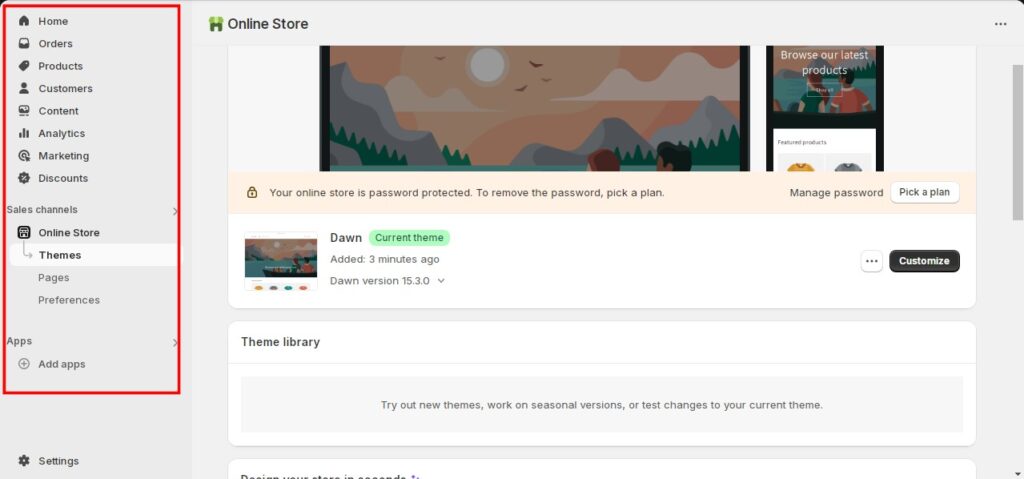
The Shopify dashboard simplifies managing your store…! Key tabs include:
- Home: Your central hub for updates and analytics.
- Products: Where you add and manage inventory.
- Orders: Track and fulfill customer orders.
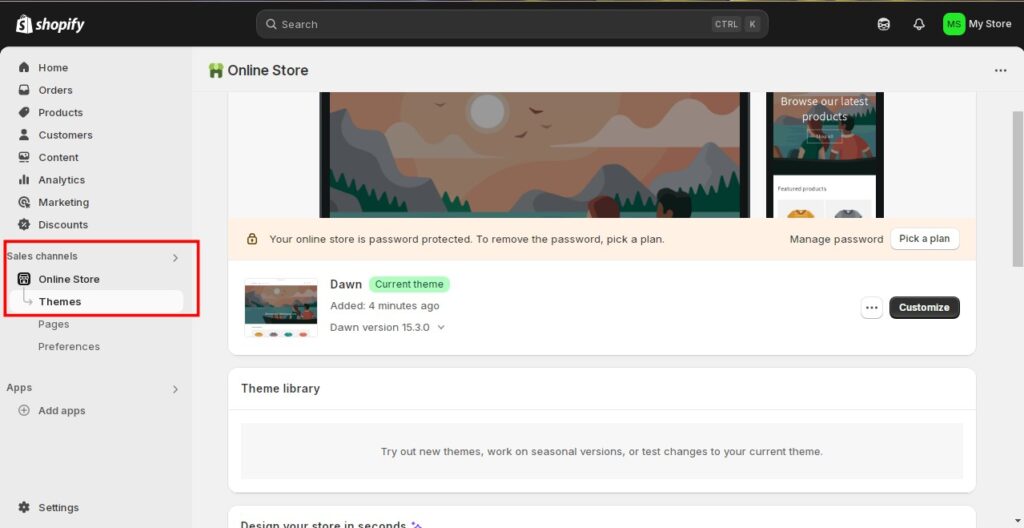
- Online Store: Customize your website’s design and layout.
Spend time familiarizing yourself with the dashboard to make the most of Shopify’s tools.
Choosing a Theme for Your Brand
Why Your Theme Matters
Your theme is the first thing customers notice when they visit your store. It sets the tone for your brand and can influence the shopping experience. A clean, responsive design builds trust and encourages visitors to stay and explore.
How to Choose the Right Theme
Shopify offers free and premium themes in its Theme Store. Here’s how to find the perfect one:
- Identify Your Brand Aesthetic: Are you going for modern minimalism or bold and colorful? Choose a theme that reflects your vibe.
- Look for Functionality: Pick a theme with features like homepage sliders, product quick views, and flexible layouts.
- Test for Responsiveness: Ensure your theme looks great on mobile devices, as mobile shopping continues to rise.
Example: The “Debut” theme is a popular free option for beginners, offering clean designs and simple customization.
Once you’ve selected your theme, install and customize it to match your branding.
Adding Your First Product
How to Add a Product
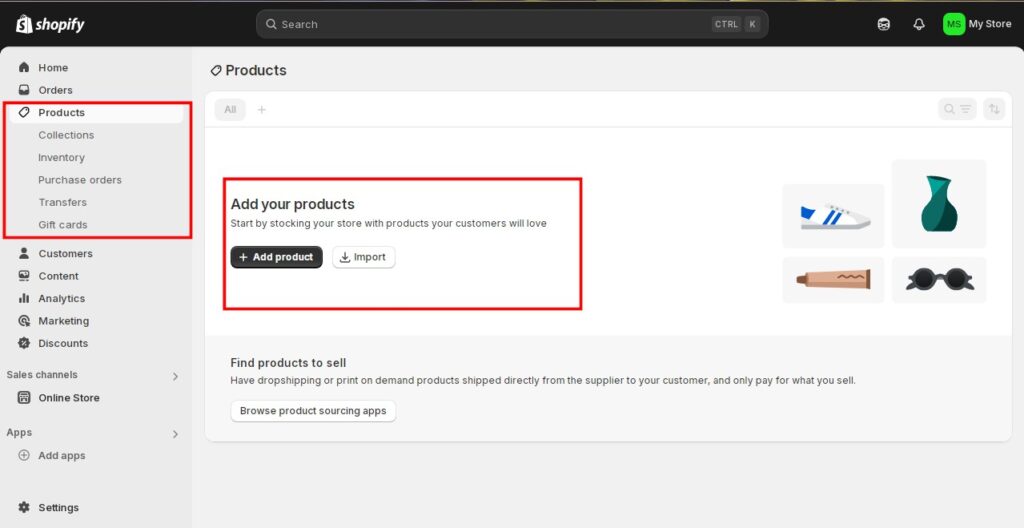
Adding products to your Shopify store is simple:
- Go to the “Products” tab in your dashboard.
- Click “Add Product.”
- Input details like the product name, price, and description.
- Upload high-quality images showcasing your product.
Writing Compelling Product Descriptions
Your product descriptions should sell the benefits, not just the features. For example:
- Weak description: “100% cotton, available in three colors.”
- Strong description: “Crafted from soft, breathable 100% cotton, this tee keeps you comfortable all day. Available in bold shades to match any style.”
Optimize your product titles and descriptions with keywords like “beginner-friendly Shopify store” or “e-commerce tips” to help customers find your products online.
Setting Up Payments and Shipping
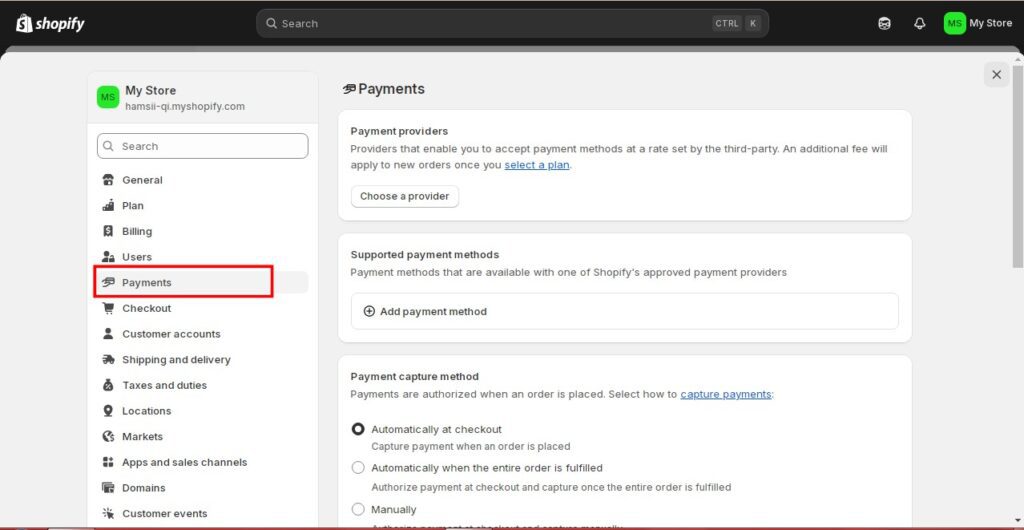
Setting Up Payments
Enable Shopify Payments for a seamless experience, or connect gateways like PayPal or Stripe. Shopify Payments is secure and supports global currencies, building trust with customers.
Shipping Setup
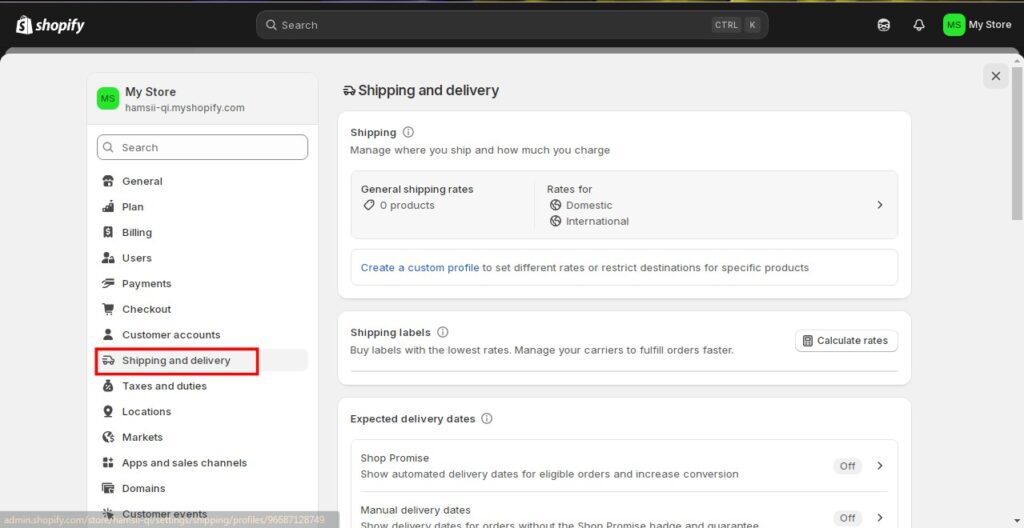
Under “Settings,” go to “Shipping and Delivery” to set up options. Popular options include:
- Free shipping for orders over a certain amount.
- Real-time carrier rates to pass on accurate costs to customers.
Shopify also allows you to automate tax calculation, saving you time and hassle.
Marketing Your Store to Attract Customers
Basic Marketing Strategies for Beginners
- Social Media Marketing: Create business profiles on platforms like Instagram and Facebook. Post engaging content, including product photos, customer testimonials, and behind-the-scenes shots.
- Email Marketing: Use tools like Shopify Email to send welcome emails, discounts, or product updates to subscribers.
Leveraging Shopify Marketing Tools
Shopify offers built-in marketing tools to help you grow:
- Run promotions or discount codes with just a few clicks.
- Track visitor traffic and conversion rates through built-in analytics.
- Boost visibility by optimizing product pages for SEO and running blog content around relevant topics.
Start Building Your Shopify Store Today
Launching an online store has never been easier, thanks to Shopify. From setting up your store to marketing your products, Shopify empowers you with all the tools you need to succeed—even as a beginner.
By following this guide, you’ll master the basics of online store setup, create a visually appealing store, and attract customers. And remember, every successful store starts small. Take advantage of Shopify’s free trial and get started today.
Conclusion
Starting an online store isn’t just about selling—it’s about sharing your passion with the world. Your Shopify store could be the beginning of something extraordinary. The only way to know? Start today.
If you are ready to start your business and know how you can become a high level businessman in this field then don’t waste a single seconds, we can help you start your E-commerce Journey. Go through our affordable services.